

Paraphrasing tools exist because rewriting sits at the center of modern study and work. Students rewrite sources to avoid plagiarism flags. Researchers restate ideas to fit new contexts. Content creators reshape the same message for blogs, social posts, and newsletters. Professionals rewrite reports and emails when clarity fails or tone misses the mark.
A strong text rewriting tool does more than swap words. It protects meaning, improves flow, and reduces similarity without sounding mechanical. Weak tools break logic, soften claims, or introduce strange phrasing that forces users to rewrite everything again. Honestly, that defeats the point.
We think three factors separate reliable paraphrasing software from the rest. First, meaning stability. Second, natural sentence rhythm. Third, user control over rewrite intensity. Extra features help, but they never rescue poor rewriting quality.
This article compares the best paraphrasing tools students and professionals actually use today. Academic platforms, freemium favorites, and advanced AI systems all appear here. Each tool rewrites similar text so differences stay visible. Pricing, limits, and real-world editing effort receive equal weight.
The goal stays practical. By the end, you should know which sentence rewriter tool fits your workload, budget, and tolerance for post-editing.
Accuracy sits at the top. A text rewording tool must restate ideas, not replace them. Meaning drift causes the biggest problems in academic work, especially when arguments rely on precise wording. According to our analysts, tools struggle most with abstract claims and long sentences.
Natural language output follows closely. Good paraphrasing reads like a focused human rewrite. Bad output sounds stiff, cheerful, or oddly generic. Sentence rhythm matters. Vocabulary range matters. Tools built on fixed templates usually fail here.
Ease of use affects daily productivity more than people admit. Students working late want fast processing and simple controls. Overdesigned dashboards slow momentum. Browser extensions and document integrations help, but only if they stay stable.
Pricing shapes access. Free paraphrasing tools work for short tasks, yet limits appear quickly. Character caps, daily quotas, or locked modes push users toward paid plans. Value matters more than price. A $10 plan that saves several hours per week feels cheap.
Extra features sound appealing. Grammar checks, plagiarism scans, tone controls. Some add value. Some distract. Grammar suggestions help when paired with rewriting. Built-in plagiarism checks help students double-check submissions. Tone controls matter more for marketing than academic writing.
Language support matters for multilingual users. English dominates, though strong tools now support Spanish, French, and German. Quality varies by language. According to our data, English paraphrasing remains the most reliable across platforms.
Integration options round things out. Google Docs, Microsoft Word, and browser extensions reduce friction. API access matters for bulk rewriting. Still, output quality decides whether integration even matters.
Eduwriter takes a clear stance. Academic writing comes first. The text paraphraser targets students, researchers, and anyone working under citation rules.
The interface stays simple. Paste text, choose rewrite strength, and generate results. No creative prompts. No marketing copy distractions. That restraint helps students stay focused.
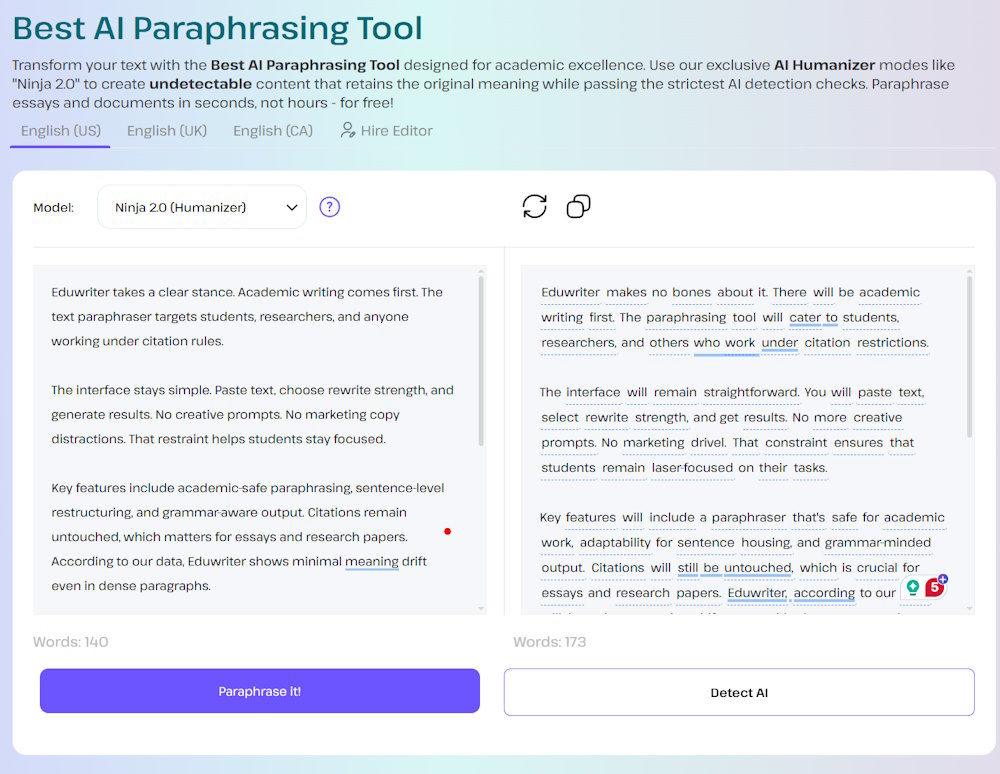
Key features include academic-safe paraphrasing, sentence-level restructuring, and grammar-aware output. Citations remain untouched, which matters for essays and research papers. According to our data, Eduwriter shows minimal meaning drift even in dense paragraphs.
Pricing follows a student-friendly model. A limited free tier allows short rewrites. Paid plans unlock higher word limits and faster processing. Costs remain lower than enterprise tools.
Strengths appear in meaning preservation and clarity. Weaknesses appear in creative flexibility. Marketing text can sound stiff. Bulk processing lacks advanced controls.
Best for: essays, reports, literature reviews, scholarship applications.
QuillBot remains one of the most widely used paraphrase tools online. Many students discover it early and keep using it through graduation.
The platform offers multiple rewrite modes. Standard, Fluency, Formal, and Creative. Users can adjust synonym strength manually. That flexibility attracts a wide audience.
Free users face character limits and restricted modes. Premium plans unlock longer rewrites and faster processing at a mid-range price.
Integrations stand out. QuillBot works inside Google Docs and Microsoft Word. Browser extensions speed up daily tasks.
Output quality varies by mode. Fluency mode preserves meaning well. Creative mode sometimes overreaches. According to our analysts, technical academic language still causes issues.
Grammarly treats paraphrasing as part of writing improvement. It focuses on sentence-level suggestions rather than full-text rewriting.
Users accept or reject alternatives, keeping control high. AI suggestions improve clarity, concision, and tone.
Pricing sits higher than most student tools. Free plans offer limited suggestions. Premium plans unlock advanced rewrites.
Grammarly excels at precision. Meaning rarely shifts. The scope remains limited for long essays.
Wordtune focuses on real-time rewriting. Suggestions appear as users type.
Tone changes and length controls work well for emails and summaries. Academic tone sometimes softens too much.
Browser extensions power most usage. Free access includes daily limits.
These tools represent free paraphrasing options. No accounts. No payments.
Output quality stays inconsistent. Grammar errors and meaning shifts appear often. According to our data, similarity drops, and readability suffers.
Jasper targets content teams, not students. Paraphrasing sits inside a larger content creation system.
Advanced AI produces fluent rewrites with tone control. Pricing exceeds student budgets.
EduWriter and QuillBot rate highest for students. Grammarly works best for polishing drafts. Wordtune fits communication tasks. Free tools trade quality for access. Jasper dominates the creative scale but costs more.
Students on a budget should start with Eduwriter or QuillBot. Academic researchers benefit from cautious rewriting. Professional content creators prefer Jasper or Wordtune. Business communication fits Grammarly. Quick tasks suit free tools. Bulk processing favors paid plans.
Always review output. Compare against the source. Edit manually. Paraphrasing does not remove citation duties. According to our data, manual review cuts plagiarism risk sharply.
Choosing a content rewriting tool often feels minor. It is not. The wrong choice wastes time, raises stress, and leaves you fixing sentences at midnight. The right one does quiet work in the background. It protects meaning. It sharpens clarity. It gives you room to think instead of panic.
No single tool wins every situation. Essays demand caution. Research demands precision. Daily writing demands speed. Matching the tool to the task changes everything. Used carefully, online paraphrasing tools reduce pressure and improve results. Used blindly, they create more work than they save.
Be selective. Edit every output. Trust your judgment more than any button. When paraphrasing supports your thinking instead of replacing it, that is when these tools actually help.